Hacker10

  • Privacy no logs VPN that works well on Fedora Atomic

    Finding a VPN that runs cleanly on an immutable OS like Fedora Atomic isn’t easy. The biggest challenge is a reliable kill switch that doesn’t require changing the system’s core files — tweaking iptables or nftables yourself is possible, but it’s not beginner-friendly. Most solid Fedora Atomic solutions rely on the command line, though some providers ship GUI clients that work within the OS’s layering model.

    Windscribe

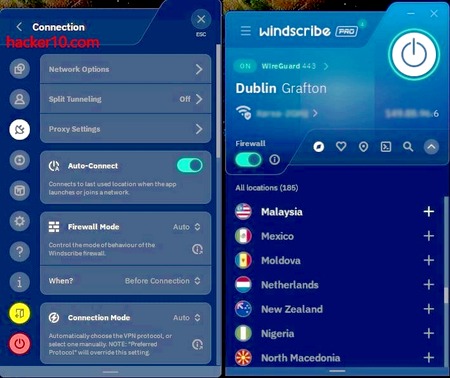
    • Provides an rpm package that can be layered into Fedora Atomic and includes a Windows-style GUI plus a dependable kill switch.
    • The free plan is great for testing and requires no payment details.

    Mullvad

    • Offers a Fedora-friendly GUI and implements its kill switch using nftables.
    • Known for a straightforward, year-round pricing approach (no discounts), so you always know what you’ll pay.

    OVPN

    • Swedish provider with RAM-only servers and a strict no-logs policy.
    • Lightweight Linux GUI client that works on Fedora Atomic; fewer features but everything essential — including a working kill switch — functions reliably.

    ProtonVPN

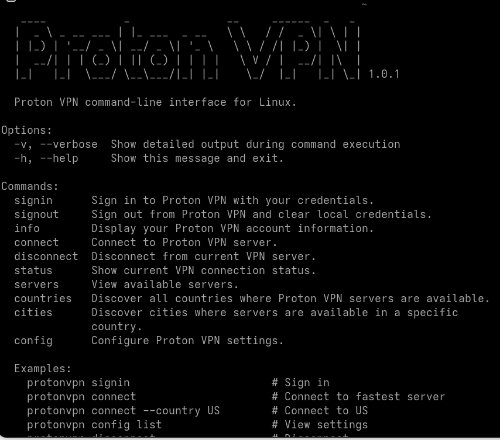
    • As of June 2, 2026, the ProtonVPN Linux GUI is basic and its GUI kill switch is less reliable than the CLI version.
    • If you’re comfortable with the command line, their CLI client is my recommendation for Fedora Atomic.

    Hide.me

    • Audited, no-logs provider based in Malaysia (outside the 14-eyes, and with no mandatory data-retention laws).
    • While Fedora Atomic isn’t explicitly listed, hide.me provides an excellent CLI client (written in Go) that runs on Fedora Atomic and includes a trustworthy kill switch.

    NordVPN

    • Offers an official .rpm package that can be layered into Fedora Atomic via rpm-ostree, giving you access to their GUI and kill switch.

    Pricing and renewal notes

    • ProtonVPN and NordVPN run promotions from time to time but tend to renew at full price — cancel before renewal if you don’t want to be charged more.
    • Windscribe and hide.me offer yearly discounts that guarantee renewal at the same promotional price, making them convenient if you don’t want to hunt for deals later.
    • OVPN also offers yearly pricing that renews at the discounted rate.
    • Mullvad never discounts; their steady pricing means you won’t be surprised by a higher renewal.

    Quick recommendation

    • If you prefer GUIs and an easy test drive: try Windscribe (free tier).
    • If you prefer a privacy-first, consistent price: Mullvad.
    • If you’re comfortable with the CLI and want maximum reliability on Fedora Atomic: ProtonVPN or hide.me.

  • Fine tuning Fedora Atomic 44 after installation

    Why pick Fedora for security and privacy?

    Like other Linux distributions Fedora does not track you, it is open source and gets security updates. You should go for Fedora instead of other distributions because they have a big community and they get funding and support from Red Hat, this guarantees that the distribution is not run by a single developer and it is not going to become abandonware. Another worthy distribution is Ubuntu but I weighted towards Fedora because Red Hat is based in the USA and Canonical, Ubuntu parent company is based in the UK where free speech laws are more restrictive and surveillance is more omnipresent, for security and privacy I consider Fedora to be better.

    Steps to do after installing Fedora Atomic, notice that non Atomic versions use dnf, these instructions are specific of the Fedora Atomic version which is more secure.

    1. Change font size to Large font by going to accessibility menu in Gnome
    2. Make sure your operating system time is synchronised or 2FA apps won’t work. In Fedora you can set up NTS (Network Time Security) a more secure NTP (Network Time Protocol) by doing this:

      Edit chrony.conf using the command line with:

      sudo nano /etc/chrony.conf

      Inside the file use the add the following NTS servers

      server time.cloudflare.com iburst nts
      server 0.ubuntu.pool.ntp.org iburst nts
      server 1.ubuntu.pool.ntp.org iburst nts


      Make sure this line is uncommented in chrony.conf

      ntsdumpdir /var/lib/chrony

      restart chronyd with:

      sudo systemctl restart chronyd

      If you want to check if chronyd has been configured correctly use:

      chronyc sources -v

      timedatectl

      chronyc sourcestats
    3. Install the Brave browser from the official website: https://www.brave.com
    4. Install HP Printer software HPLip from HP official website:

    https://developers.hp.com/hp-linux-imaging-and-printing/gethplip

    In command line sudo rpm-ostree install hplip

    Install HPLIP GUI: sudo rpm-ostree install hplip-gui

    5. Install KeePassXC using the official Fedora repository

    6. Install WindScribe from their official VPN site.

    7. Standard Notes has a non official Flatpak their official Linux app is only for Ubuntu, for security reasons is best not to donwnload the non official FlatPak and only use Standard Notes web version, the Brave browser will give you an option to install it as app.

    8. Install Shotime, the video player known as “Video Player” in Fedora official repository, make sure it is the FlatPak version not distributed by Fedora as otherwise it will not come with non free codecs needed to play some files.

    9. Install Safe the secure offline password manager based on KeePassXC, it can be downloaded from Fedora official repository.

    10. Other applications to install are LibreOffice to have a full featured Word Editor, Pinta as a graphics editor, Document Scanner to scan documents with HP Smart Tank 5105, Peazip to extract files and DéjàDup to back up your data.

  • Is ProtonMail Safe? 6 Hidden Risks of ProtonMail and ProtonVPN Exposed

    Is ProtonMail Safe? 6 Hidden Risks of ProtonMail and ProtonVPN Exposed

    As much as Proton tries to market itself as a foundation they are no different from a big corporation when it comes to profits and marketing. Let me give you some examples of this:

    • They lure paying users with steep introductory discounts available for new customers only and prices surge significantly after the first year. This “bait-and-switch” tactic leaves many users facing renewal rates 2-4x higher.
    • Posts in ProtonVPN’s official subreddit are not visible without moderator pre-approval and they frequently remove critical comments under vague pretexts like being off-topic or already posted, this creates an echo chamber where positive experiences dominate.
    • Proton pays money to influencers to promote some of their services, the pay for sign up model leads to biased endorsements.

      Reference: YouTuber “The Hated One” Exposes Proton’s Shady Tactics: In his November 2025 video, he reveals Proton offered him $70 per signup to shill their services—but after rejecting the deal and requesting a CEO interview instead, Proton ghosted him completely, ignoring all follow-ups.
    • ProtonMail has cooperated with law enforcement in several documented cases where they hand over the recovery email address you enter when you open your account with them, Proton is fully aware that the recovery email is not encrypted and handed over when they are subpoenaed, they justify themselves by saying that the user entered it and what not but the fact is that they know about this security hole and do nothing to address it.

      Reference: Encrypted services Apple, Proton and Wire helped Spanish police identify activist
    • Swiss privacy laws are comparable to those of the European Union, you are not safer by Proton being based in Switzerland instead of Germany. As an example in 2021 ProtonMail was forced by a Swiss Court to do real time IP logging of a French climate activist occupying buildings.

      Reference: ProtonMail Gives Up Logs on User, Then Scrubs Website of No IP Logging Claims
    • And finally a politically charged argument: Proton announcing in their X account that they had donated $100,000 to the Palestinian Red Crescent right when Israel was defending itself from Islamic terrorists, as European who stands 100% behind Israel this feels like a betrayal, I want my money to be spent aiding Israeli civilians and not on Gaza under Hamas control, I won´t be supporting any company that gives money to Gaza.

  • Windscribe vs. PIA VPN: Which Offers Better Privacy in 2025?

    Windscribe vs. PIA VPN: Which Offers Better Privacy in 2025?

    I have been using Private Internet Access VPN for three years, and I recently moved to WindScribe, now that I have used both companies I can make a fair comparison, I don´t use AI anywhere in this blog.

    Both companies PIA and WindScribe have strong no logs privacy policies and are based in countries involved with mass surveillance, The Five Eyes, this does not put me off if you trust their no logs claims but it concerns me that the UK free speech laws are some of the most limited in the Western world, the UK is know to arrest people posting nationalist British views in social media, this is the main reason why I moved to WindScribe but since I moved I also discovered that WindScribe not using virtual servers considerably reduced the number of captchas and wrong IP locations I get. It is also noteworthy that WindScribe engages with the community in Reddit, something PIA does not despite having an official subreddit too, and WindScribe does not have any affiliate program that could buy them good reviews like PIA VPN does.

    Even though WindScribe is more expensive than PIA, this is to be expected when you only use real servers and I decided to keep WindScribe as my VPN provider, but avoiding what I consider unsafe locations like India and Hong Kong (China), countries where unregistered VPNs are not legal or demand them to keep logs, that is the only regard where PIA VPN has done better by refusing to do business in those countries instead of renting a server and hoping for the best. On the other hand if you need a real VPN server in Russia, WindScribe is one of the few VPN providers able to provide it, what I consider a handicap could be a blessing for others, overall, so far I am really happy with WindScribe.

    PIA VPNWindScribe
    StrengthsVery cheap if you pay yearly

    Audited no logs
    They only use physical servers

    They engage with the community in Reddit

    They don´t own any other VPN company and are transparent about ownership

    They have real servers in exotic locations

    They have no affiliate program to pay VPN top lists and influencers

    Free generous plan to try the VPN without payment
    Drawbacks
    Owned by Kate Technologies with headquarters in the UK

    Parent company owns other big VPN companies like ExpressVPN and CyberGhostVPN

    Parent company owns VPN review site VPNMentor where they recommend their own VPN (conflict of interests)

    They have many virtual locations and it is difficult to find out where the real physical server is located

    There is no community engagement in Reddit or any other place

    There are lots of fake reviews in VPN top lists due to their affiliate program
    Headquarters in Canada

    Non serious marketing communications full of jokes for children

    They have servers in countries where no logs VPNs are not legal like India and Hong Kong (China)


  • Sideload TubiTV app to your smart TV (2025)

    Sideload TubiTV app to your smart TV (2025)

    Today I sideloaded TubiTV to my Smasung smartTV, if you live in a country where TubiTV is available you don´t need to do any of this, the instructions are only for people being geoblocked by TubiTV, as a side note, this should work for many other apps like LiveOne.

    I will describe my hardaware because depending on hardware things might change, I am using a Samsung smartTV with an Android TV box, brand “Strong”, based in Austria but owned by a Chinese conglomerate, they are not one of the cheapest Android set up boxes out there but you know it won´t come loaded with malware as it is a well known brand within the Android set up boxes community, and more important, it runs Android 11, which makes it harder to install unauthorized software.

    You will need an Android phone too, these are the instructions to sideload TubiTV to your smart TV.

    • Download the app SendFilesToTV from the official Google play store to your smartphone and to your smartTV, the app must be installed in both devices.
    • With your phone go to the alternative Google playstore UpToDown and download any app, for example TubiTV, this will be a .apk file.
    • In your smartphone click on the Send Files To TV app, click the button that says “Send” browse your .apk file downloaded from UpToDown and select sending it to your set up Android box which will show up in the destination if you are in the same Wi-fi network, this only works if your smartphone and the Android set up box are both in the same network.
    • Go to your smart TV open the Send Files to TV app, click on Receive and you will see the .apk file, click on it and pick install, you will be prompted to change one security setting to be able to install it, the instructions are very clear, read the screen and change the setting UpToDown tells you, after this you will have UpToDown installed in your smartTV.
    • Open the alternative Google PlayStore you just installed in your smartTV, go to media and you will find TubiTV and thousands of other apps, now you can pick any app you want and install it without having to use any work around.

    For security uninstall SendFilesToTV after leaving a review to the developer if everything has worked for you, the app is free at the very least you could leave a review right? You can use other alternative Google play stores like ApkMirror, a Chinese company but my favourite store is UpToDown for no other reason that I don´t trust the Chinese government when it comes to privacy and security.

    Needless to say that you will still need a VPN to watch TubiTV, you can try WindScribe for free without payment asked and see if it works for you, they support streaming, or pick your own VPN. English speaking countries where TubiTV is known to work: United States, Canada, Australia, United Kingdom.

  • List of the best free webmail privacy services

    List of the best free webmail privacy services

    One of the most private email communication systems consists in using Tor or a VPN to connect to a free webmail service and encrypt the messages yourself with PGP, this method gives you privacy and anonymity. Thunderbird+Enigmail, or GPG4Win can do that and it won’t cost you a cent, the problem is the time and learning curbe it takes to do this.

    Encryption built-into the webmail service might not as secure as doing it yourself but if the company claims are true, encryption secure and their privacy policy trustworthy, it is a really easy way to secure your email messages.

    Atomic Mail: Free encrypted email service with aliases, zero access encryption and no advertising. Atomic Mail is a new privacy email service based in Estonia compliant with European GDRP privacy laws. You can use it to send password protected emails to people using an insecure email providers, when you send a password protected email only the link to the message hosted in a secure server is sent and not the content.

    Proton Mail: Company keeps minimum logs and can not read your data as the inbox is encrypted. Servers are based in Switzerland. Communicating with other Protonmail users is end to end encrypted, and emailing other email providers is done in plain text, to make the best of this service your friends should ideally be using too. the company itself can’t read your data.

    Tuta Email: Email privacy service based in Germany, messages are encrypted in your browser and nobody can access the encryption keys, Tuta staff has no decryption keys, they keep no login IPs and have no way to identify customers or decrypt data. They also publish transparency reports showing how many court orders they had and what it was done about it, like, handing over encrypted data.

    Tutanota free privacy email
    Tuta free privacy email service

    VFEmail: With support for PGP encrypted webmail using the interface and anonymous sign up using Tor, this service has a Tor hidden node from where you can access your account. Metadata is scrubbed from emails and your computer IP removed from the headers.

    Mailfence: Email service hosted in Belgium that supports sending OpenPGP encrypted messages and two factor authentication.  Seamless keystore integration.  All encryption happens in the browser.  Service includes a calendar and cloud document storage with paid for accounts giving you access to Android and iPhone apps to access your email using a portable device.

    NOTICE: List only includes services with free option. If you are willing to pay for a privacy email service other companies you should look at are Posteo (Germany), Countermail (Sweden), StartMail (Netherlands), CodaMail (USA) and KolabNow (Switzerland).

    Webmail services hiding your IP

    The following email services do not encrypt your messages but hide your computer IP in the headers. I tested all of them and the sender’s IP is replaced with a neutral IANA (Internet Assigned Numbers Authority) private IP address, a range of IP addresses not linked to any country or person reserved for use in private networks, the only way to find out who sent the email is to contact the company and ask them.

    Yandex: Russian email provider offering Email accounts in multiple languages, with huge storage space (10GB), beautiful interface of interchangeable themes, spam and virus filter and free storage for files and documents. Yandex strips your email from the headers but this is not a privacy service they keep internal logs of the real IP in case of abuse.

    GMX Mail: Free German email provider with PGP encryption, large attachments, filter rules and mail collector as well as 10 free aliases to be able to compartmentalize different online identities. GMX finances the free email service with advertising being displayed on their page.

    NOTE: Some email services will only strip your computer IP from the headers for webmail and include the computer IP in messages sent using SMTP.

  • Review Dutch free speech host LibertyVPS

    Review Dutch free speech host LibertyVPS

    LibertyVPS is a hosting provider that has been in business four years and they specialise in free speech. Their servers are located in the Netherlands, so your content will have to be compliant with Dutch law, the company provides hosting for those facing censorship but they also warn in their terms and conditions that they will work with law enforcement to prevent illicit activity.

    I asked them if I could host pharmacy related products like Viagra or vitamin supplements and I was given a link to their terms and conditions where the only listed content restrictions are child porn, spam, malware and human and animal pain sites, the bottom line is that LibertyVPS doesn’t allow any activity which is illegal but will happily host whistle blowers and sites exposing government and corporations malpractice and abuse.

    LibertyVPS control panel free speech hosting
    LibertyVPS control panel free speech hosting

    Prices are reasonable, I did not feel I was being charged extra for privacy, but if you are after unlimited bandwidth you have to upgrade to a VPS, which can be set to CentOS, Ubuntu, Fedora, Debian or OpenSUSE, even if you pick one distribution you will not be stuck with it for ever, you can reinstall the VPS with a new distribution using the control panel.

    For shared hosting LibertyVPS is using a standard cPanel that most people will be familiar with and you can back up your own site using it. They also offer Windows VPS which I did not test.

    Uptime was fine, I have not been with them for long but so far all good and the backbone is provided by Dutch company Ecatel, with up to 1 Gigabit line speed. Support is only via ticket, LibertyVPS replied to the three tickets I opened in under 24 hours.

    Overall I think that this company fills in a much needed niche, free speech hosting on a budget, reliable, with good support, standard industry hosting software and payment in Bitcoins. I can´t think of too many improvements for this company and even if you don´t need a free speech host, given their average prices, I would also recommend them for hosting mainstream content outside the US.

    Visit LibertyVPS host