Convergence, a digital Certificate Authority replacement

Convergence is an open source project that wants to replace Certificate Authority organizations issuing standardized X.509 digital certificates and confirm that the company signing it is who they say they are, for which a fee is normally charged, it can be very expensive to get a reputable Certificate Authority  (i.e. Verisign, GeoTrust)  that is included in all major Internet browsers root to confirm your identity. There has also been instances in which a Certificate Authority has been hacked by criminals, and likely nation states, to sign their unauthorized digital certificates with the own CA private keys allowing them to launch man-in-the-middle attacks against which the user has no defense.

It is possible for someone to create a self-signed digital certificate, or buy a cheap one from a small Certificate Authority, but this will cause the Internet browser to beam a security warning during the SSL handshake and it easily scares off people not familiar with computer security.
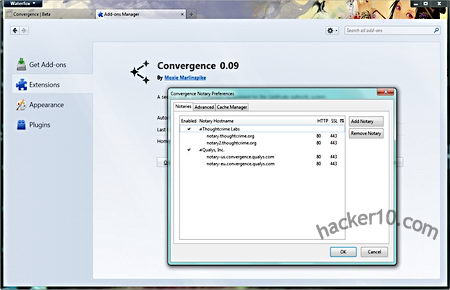
Convergence P2P digital certificate authority replacement

Convergence P2P digital certificate authority replacement

Convergence allows people to configure a dynamic set of notaries that use the whole network to validate the communication, instead of having someone else telling you who to trust a whole set of users decide who is trustable.

Anyone can run their own notary, the notary trust level can be set by the whole network of multiple notaries, information exchange is immediate and hides the user IP address, Convergence intends to eliminate the problem that comes with blindly trusting a single Certificate Authority and places trust in the hands of the whole community using the notaries network to check a digital certificate history before validating it, for this to work it will be necessary a large number of notaries.

Visit Convergence homepage

Note: Only available for Firefox users as an addon.

How to obtain a digital certificate for free

A digital or SSL certificate consists of two encryption keys, one public and one private, a very common use for digital certificates is to encrypt data exchanges in between a user Internet browser and any e-commerce website but it can also be used to sign documents, encrypt and digitally sign email messages and identify yourself online. Once a digital certificate has been installed in your Internet browser or email client, it is easier to use than encryption software, many users are not even aware they are using it, if the SSL certificate is personalized a password might be asked before using it.

Typical digital certificates will contain a serial number, signature algorithm, issuing authority, valid from and expiry date, public key and a hashed number to guarantee that the key has not been tampered with.

Places to obtain a free digital certificate

CAcert: To be issued an SSL  X.509 standard certificate you are asked you to join the CAcert community filling in an online form, in between others you can use CAcert certificates to secure websites, digitally signing or encrypting emails and files.

GetaCert: Not a Certificate Authority (CA), GetaCert appears to be a website using OpenSSL to create a digital certificates online, they can be issued for use with email and websites, all of their certificates are valid for 10 years and wildcards are supported.

StartSSL: Issuing free Class 1 (for individuals) SSL certificates valid for one year, renewable after expiration, security is as good as StartSSL paid for digital certificates but with some limitations like no wildcards allowed and it doesn’t hold identification details.

If you only need a digital certificate to sign and encrypt  email you can get Comodo email SSL certificate.

Types of basic digital certificates

  • Personal certificate: It works as a digital ID guaranteeing that the person is not someone else, a personal certificate can be used to identify yourself over the Internet with a company or Government agency, digitally sign an email message or a PDF file, a password will normally be asked when carrying out these tasks, using the something you have and something you know security model.
Diagram digital certificate encryption

Diagram digital certificate encryption

  • Server certificate: It identifies a user when establishing a connection before transmitting any information, email and Usenet servers use a server certificate when authentication takes place via SSL.
  • Software certificate: It verifies software before installing it in your computer by checking the code digital signature making sure the program has not been replaced by malware having been signed by a genuine developer, useful when downloading software from the Internet.

Unrecognised digital certificates warnings 

All Internet browsers come with digital certificates installed, these are issued by certification authorities like VeriSign or GeoTrust, when the browser comes across a website using a digital certificate which public key is not found in the browser you will get a not recognized certificate warning, this does not mean the site is not safe, it only means one of the key pairs has not been stored in the browser.

It is impossible to have every single company SSL certificate stored in the browser, when you get this kind of warning you should check the digital certificate making sure it is not a man in the middle attack by looking at its properties, when satisfied that everything looks correct, install it, after that you will not get any more security warnings when visiting that site.

Digital certificate security warning

Digital certificate security warning

When you install software you could find Windows warning you that the driver has not been digitally signed, Microsoft charges a huge amount for this ‘”privilege” and not all developers can’t afford it, it doesn’t necessarily mean the software is dangerous, it only means it has not been approved by Microsoft.

How to make your own SSL certificate 

An alternative to companies issuing free SSL certificates is to create your own Certificate Authority or self-signed digital certificate using OpenSSL, an open source implementation of SSL and TLS, any decent Linux distribution will come with OpenSSL installed, you will need some basic Unix knowledge, go to the command line generate an RSA private key, generate a Certificate Signing Request (CSR) and generate a self-signed certificate, for the necessary commands to do this type man openssl at the Linux command prompt.

You can use OpenSSL and other Unix utilities in Windows using Cygwin, a Unix framework for Windows, it is beyond the scope of this article to explain how Cygwin works.