Tag: Android encryption

  • Encrypt data in Android with Secret Space Encryptor

    Encrypt data in Android with Secret Space Encryptor

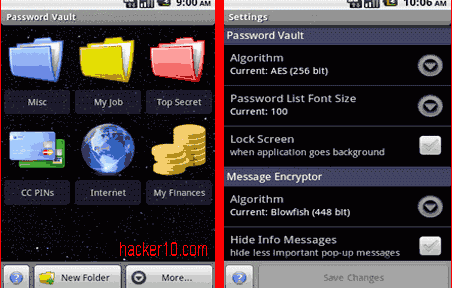
    Secret Space Encryptor is a cross platform tool made up of a password manager, message encryption to encrypt text, and file encryption to password protect photos or videos. Each function can be configured in settings to apply a different cipher algorithm, Secret Space Encryptor comes with a wide range of ciphers: AES-256bit, Blowfish-256/448bit, Serpent-256bit, Twofish-256bit and Gost-256bit.

    File encryption will preserve timestamps and associate .enc files with the utility, the password manager can classify data inside coloured folders and back everything up exporting it to an encryped .pwv file that can be later imported back or save it unencrypted to an .xml file, a standard format to import data into other applications like a different password manager.

    Secret Space Encryptor Android
    Secret Space Encryptor Android

    You will find other embedded privacy utilities like a clipboard cleaner, algorithm benchmark or customizable password generator. The software is very complete and open source, giving you some guarantee against backdoors, amazingly this free app has no advertisements or nagging screens, this a very easy to use encryption tool, the software is available for Windows, Android, Linux and Mac OS X, there is a java version of the program that runs on any OS with Java installed.
    Visit Secret Space Encryptor homepage

  • Android encrypted data backup with truBackup

    Android encrypted data backup with truBackup

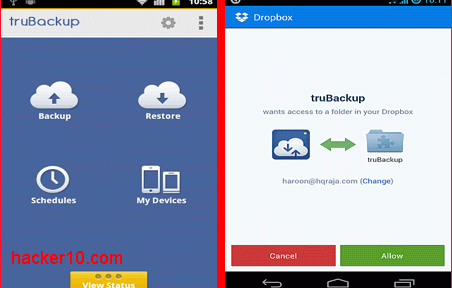
    truBackup is an Android app to backup an restore data,  it allows you to select the files you wish to copy, like contacts, SMS, applications, or media files with photos and videos. Data can be backed up to internal or external storage (SD card) or to the cloud in your DropBox account, truBackup main interface is clear and simple to use, with only four buttons to tap on its main window: “Backup” ; “Restore” ; “Schedules” ; “My Devices“.

    When you first run the app it will ask you where you would like to store the data and shown backup progress when you tap the “Show Status” bar at the bottom of the screen, you can schedule backups daily, weekly or monthly at an specified time and never have to remember again backing up your data, if you are backing up online to Dropbox, to avoid huge mobile phone bills choose the option “Wi-fi only” inside the settings.

    truBackup Android encrypted backup
    truBackup Android encrypted backup

    All data is encrypted with AES256, the app can do incremental backups, saving you time by only copying those files that have changed since the last backup, logs and reports show you what has been copied and how much space you are using, what I liked most of this app was its simple interface and being able to encrypt data prior to copying it, there are more complete Android data backup apps with built-in encryption like Titanium Backup but it is considerably more expensive.

    If you want to encrypt and back up your Android data for free you could use a cloud service like SpiderOak, but it will only work when you are online.

    Note: truBackup currently costs $2.99

    Visit TruBackup homepage

  • Android Truecrypt compatible app EDS Lite

    Android Truecrypt compatible app EDS Lite

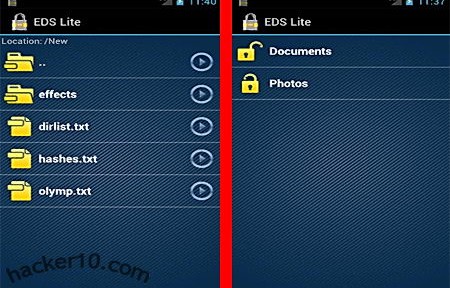
    Encrypted Data Store Lite is an Android app that allows you to save files inside an encrypted container using AES256bit, it can also mount any Truecrypt compatible container from your phone, but to do that you will have to make sure that Truecrypt settings when creating a container are set to Encryption algorithm: AES256, Hash algorithm:SHA-512 and File system:FAT, these are not Truecrypt default settings which are set to Hash algorithm RIPEMD-160, if you use a different algorithms to create a Truecrypt container then EDS Lite will not be able to mount it.

    The app comes with a simple built-in image viewer  that can show pictures and thumbnails, files with the extension .edc, EDS own format, and .tc, Truecrypt file extension, can be associated with the app for easy opening, other options allow the app to prevent your phone or tablet from going into sleep mode to make sure that an encrypted container will not be left open unattended by mistake, EDS Lite can write to an external Secure Digital storage card modifying and deleting files stored inside.

    Android Encrypted Data Storage Lite
    Android Encrypted Data Storage Lite

    A “send to” link can quickly encrypt photos or videos from the gallery, but remember that anything you leave behind if it has not been securely wiped it could still be recovered, while the encryption can not be cracked, when you view a document stored inside the container there will be temporary traces left in the external reader you used, a compromising file name and perhaps a full copy of the confidential document might have been created outside the container by a third party viewer. A full paid for version of the EDS app allows you to play media files inside the container, not leaving temporary data behind, it comes with a search index to find files inside the encrypted container, it can synchronize data with Dropbox and allows for container security using a hand-drawn pattern in succession with a password.

    It is refreshing to see attempts to port Truecrypt compatible encryption to mobile devices, having a standard is very important for long term storage and data transmission, there is nothing more annoying than being forced to download multiple programs to do the same thing and not knowing if it will work in a different platform, I hope other developers come up with similar programs.

    Visit EDS Lite in Google Play