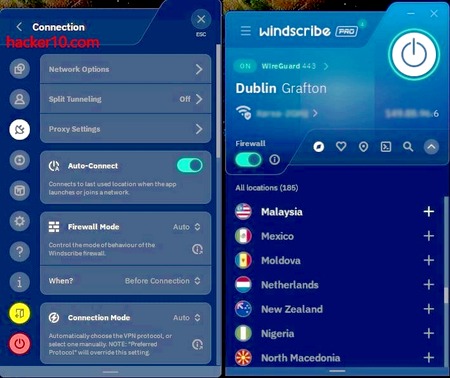
I have been using Private Internet Access VPN for three years, and I recently moved to WindScribe, now that I have used both companies I can make a fair comparison, I don´t use AI anywhere in this blog.
Both companies PIA and WindScribe have strong no logs privacy policies and are based in countries involved with mass surveillance, The Five Eyes, this does not put me off if you trust their no logs claims but it concerns me that the UK free speech laws are some of the most limited in the Western world, the UK is know to arrest people posting nationalist British views in social media, this is the main reason why I moved to WindScribe but since I moved I also discovered that WindScribe not using virtual servers considerably reduced the number of captchas and wrong IP locations I get. It is also noteworthy that WindScribe engages with the community in Reddit, something PIA does not despite having an official subreddit too, and WindScribe does not have any affiliate program that could buy them good reviews like PIA VPN does.
Even though WindScribe is more expensive than PIA, this is to be expected when you only use real servers and I decided to keep WindScribe as my VPN provider, but avoiding what I consider unsafe locations like India and Hong Kong (China), countries where unregistered VPNs are not legal or demand them to keep logs, that is the only regard where PIA VPN has done better by refusing to do business in those countries instead of renting a server and hoping for the best. On the other hand if you need a real VPN server in Russia, WindScribe is one of the few VPN providers able to provide it, what I consider a handicap could be a blessing for others, overall, so far I am really happy with WindScribe.
PIA VPN
WindScribe
Strengths
Very cheap if you pay yearly
Audited no logs
They only use physical servers
They engage with the community in Reddit
They don´t own any other VPN company and are transparent about ownership
They have real servers in exotic locations
They have no affiliate program to pay VPN top lists and influencers
Free generous plan to try the VPN without payment
Drawbacks
Owned by Kate Technologies with headquarters in the UK
Parent company owns other big VPN companies like ExpressVPN and CyberGhostVPN
Parent company owns VPN review site VPNMentor where they recommend their own VPN (conflict of interests)
They have many virtual locations and it is difficult to find out where the real physical server is located
There is no community engagement in Reddit or any other place
There are lots of fake reviews in VPN top lists due to their affiliate program
Headquarters in Canada
Non serious marketing communications full of jokes for children
They have servers in countries where no logs VPNs are not legal like India and Hong Kong (China)
A judge from Galveston County named Chris Dupuy has been forced out of office after being charged with online harassment for placing fake hooker advertisements with the photographs and phone numbers of two former girlfriends in the escorts section of a classifieds ads website.
Harris County Sheriff’s investigator Scott Hardcastle subpoenad Backstage.com to find out who had placed the adverts and found out that the IP had been masked with offshore proxy servers. Houston Press reports that the affidavit of the lead detective says that he “had worked backwards from the ads to trace masked IP addresses in Venezuela, Colombia and Germany.” and the articles goes into making fun of the software name “hidemyass.com“
If Chris Dupuy was using software to hide his computer IP, it could not have been Hide My Ass free online proxy as it is web based and there is no need for software, the article also mentions masked IPs in Venezuela and Colombia, servers that are not available to free users, only somebody with a paid account can access those proxies. Based on this Chris Dupuy was possibly using HideMyAss VPN and not the online proxy.
Click to enlarge Chris Dupoy HideMyAss
There are no further details on how the detective “traced masked IP addresses” from HideMyAss but the VPN provider logging policy page states that HideMyAss keeps logs of:
a time stamp when you connect and disconnect to our VPN service;
the amount data transmitted (upload and download) during your session;
the IP address used by you to connect to our VPN; and
the IP address of the individual VPN server used by you
The data is more enough to identify a customer if necessary and it is stored for in “between 2 and 3 months“, or “longer if required by law”, HideMyAss parent company Privax LTD operates from England and was recently acquired by AVG Technologies.
Futhermore, HMA terms and conditions do not allow using the VPN for filesharing, if you are found doing this “then we may store your VPN data for an extended period of time beyond the normal 3 month maximum“, and HMA online proxy is even more detailed than VPN logs, they record the address of every single website you visit and files you view, keeping it for 30 days.
If HideMyAss has handed over the logs for one of his users, which is not confirmed as there are no specific details on how the detective traced back the IP, this would not be the first time they help out the law enforcement, in 2011 Cody Kretsinger, was arrested thanks to HideMyAss handing over logs proving that he was responsable for hacking Sony.
A user sharing child porn in Hyphanet, the rebranded Freenet, has been arrested by law enforcement in the US. According to the news article linked below authorities identified his IP in Hyphanet but this time they are not revealing how they did it.
Freenet, a P2P network routing traffic across multiple nodes to hide people’s IP when filesharing, and often cited by the media as part of the dark web has been broken by law enforcement.
Court records related to Paul Bradley Meagher, a University of North Dakota police officer arrested for downloading child porn from the “anonymous” peer to peer network Freenet, reveal that the North Dakota Bureau of Criminal Investigation had been running an undercover operation in the network since 2011, planting their own nodes inside Freenet to be able to log people’s IPs and trace the final destination of users downloading illegal material.
The Dakota student news site relates how Investigating Officer Jesse Smith managed to get hold of Paul Bradley’s laptop still switched on and running Freenet on the Wifi network, law enforcement discovered child porn images during the preview before seizing the laptop, arresting the suspect, whom, at that point refused to talk with the investigators. Paul Bradley has now been charged with 10 counts of possession of child pornography and can be sentenced to up to 5 years in prison for each count, facing a possible 50 years in jail.
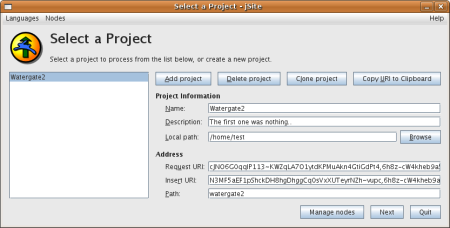
Freenet network jSite
The Grand Forks Herald from North Dakota cites detective Jesse Smith in the affidavit as admitting to her department running nodes in Freenet to be able to track people downloading files included in a list of known child porn file hashes from the police database.
Unsurprisingly, when a journalist contacted the Bureau of Criminal Investigation of North Dakota they declined to make any comment about the story, so little is known about how they track people. It could be because Freenet has far less nodes than Tor, or because Freenet code has some bug (it requires Java to run).
With further research I found that the ICAC Internet Crimes Against Children Task Force, in 2014 ran a Freenet workshop for law enforcement to present what they called the “Black Ice Project“. Quoted on their website as “This session will describe the basic functioning of Freenet, how persons exchanging child abuse material, the system’s vulnerabilities and how the Black Ice project exploits them.“
References:
“Child predators use technology, but law enforcement does too“
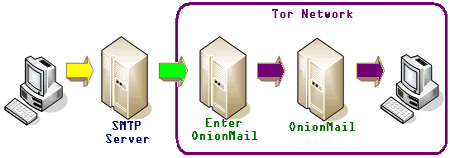
OnionMail is an open source mail server developed by hacktivists fighting mass surveillance, it runs on the Tor network and is able to communicate with the Internet as well as Tor hidden nodes.
Running an OnionMail server and joining the federated network is open to everybody, connections in between servers are always encrypted with SSL, transition servers do not store any data, only in the final destination OnionMail server saves messages and it automatically erases them after reading or if they have not been picked up by the user in a period of days, using the wipe command (Linux) to make forensic recovery impossible.
An OnionMail email inbox is encrypted with RSA/AES asymmetric encryption keys and user passwords, data is then hashed and scattered around multiple OnionMail servers in the network, if a server is seized no meaningful information or metadata can be obtained. Another security feature is the ability to remotely nuke a server’s digital certificate, this is useful if an administrator loses physical access to the server, OnionMail checks the legitimacy of digital certificates in the network and servers not using a valid one will be disconnected.
OnionMail anonymous Tor email
In Tor you don’t have to worry about revealing your computer IP but a local email system clock can give away your approximate geographical location, to stop this, OnionMail spoofs your time zone, it will also spoof the PGP version you are using, helpful in case a vulnerability is discovered in a specific PGP release, an attacker would be unable to find out who is using it without testing everybody.
For internal email communications inside the Tor network you are assigned a cryptic .onion address, this is automatically transformed into a a clearnet comprehensible address using the Virtual Mail Address Translation protocol to append the .com/.net/.info of your Tor exit node so that people on Yahoo or Gmail can reach you.
For example, if you are using the onionmail.info exit node, your .onion email address will be transformed into test.serveraddress.onion@onionmail.info when you send an email message to the Internet. Spam is eliminated using custom blacklists that mail server operators can tweak.
You can find a few Tor email providers but they are not chained and their addresses can’t be used to contact people outside Tor. OnionMail stands out from the crowd uniting all email servers in a single network and allowing users to send and receive email to the Internet from within Tor.
More than a dozen OnionMail servers are listed in the homepage, to open an account you only need to select one of them with Tor installed in your computer, or download a python script that can be used in Tails to configure your email client. Windows users can download a beta version of OnionMail and the more technical advanced people can install OnionMail in a rooted Android device with Orbot, a free proxy app that runs Tor, the K9 Mail client, and APG, a PGP key manager.
OnionMail anonymous email
OnionMail does not hide that it has been specifically developed to stop the NSA and similar espionage agencies from following you. The developers know what they are up against and they make sure that their zero knowledge design will withstand rogue operators and mail server seizure, which leaves only a trojan horse or spear phishing attack as the only way to get into your email account.
A very well designed, thought out email system with good documentation and help screenshots that has all a security paranoid person can wish for, anonymity, encryption, free and running on Tor.
StegoTorus is an open source tool that disguises Tor traffic simulating it is an innocuous protocol, this foils packet analysis making Tor harder to monitor and block. A client and server are both available for download, the software is available for Linux, Mac and Windows but is is command line operated and it has to be compiled from source, you will have to be knowledgeable in computers to benefit from it. StegoTorus website has clear instructions on how to do this, it is not exceptionally challenging.
Any Tor operator can run StegoTorus in their own bridge. Tor bridge relays not listed in the main directory, they are intended for people living in countries where public Tor nodes are blocked. Bridges can be acquired sending an email to bridges@torproject.org from Yahoo or Gmail accounts only.
Tor network bridge configuration
When you run StegoTorus with Tor an intermediate connection is created to an StegoTorus server acting as the first node to the network, the software running on that server will camouflage all traffic as PDF, JPEG or HTTP, a payload is introduced in the downstream data before passing it on to you with the real requested file or website visited hidden using steganography techniques. A StegoTorus proxy will make believe anybody watching network traffic that no Tor connection is taking place, your Internet browsing should not slow down noticeably, the payload injection is done within miliseconds.
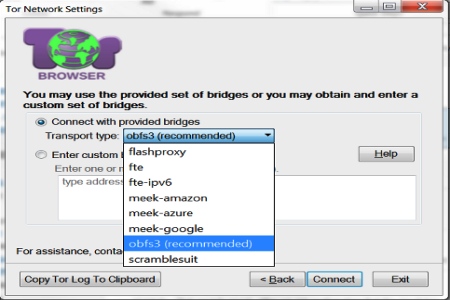
If you are worried about Deep Packet Inspection by your ISP, used by China and Iran in between others, your only choice to avoid blockage is what the Tor project calls Pluggable Transports, these are used together with secret Tor relays, aka bridges, and they transform traffic to hide that you are using Tor. A few supported transport type Tor bridges are Obfsproxy, ScrambleSuit and the Format-Transforming Encryption, other schemes like SkypeMorph and StegoTorus can be deployed but they are not officially assisted, although both projects are listed in the Bridges Tor project website, bridges of this type can not be requested by email.
If you know of a bridge that is running StegoTorus, you can connect to that node going to the Tor browser network settings and entering the custom bridge address that leads to it.
The aim of the currencies below is to make it impossible for an investigator to analyze a public ledger, known as block chain in Bitcoin, and to hide the identities of those making and receiving payments. Other advantages are that the money can not be seized and transaction fees are very low or non existent.
WARNING! The world of cryptocurrencies contain elaborate scams, pump and dump and pyramid schemes. I am not endorsing any of the currencies below, it is your duty to double check claims about anonymity and trust.
Dash(DASH): One of the most popular, Digital Cash is a Bitcoin based electronic currency focused in privacy. The wallet contains a coin mixer, you have the choice to make your financial operations public or anonymous, using a decentralized network of servers called masternodes that anonymize the transaction, the level of anonymity can be configured to in between 2 or 8 node hops. Digital Cash coins can be earned if you help the network running a masternode but this is not necessary.
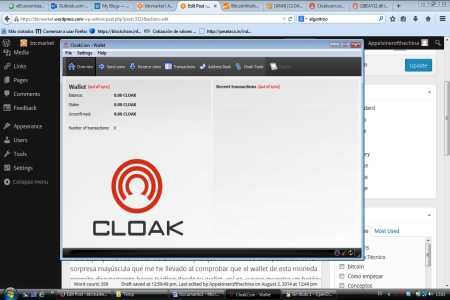
CloakCoin(CLOAK): Every CloakCoin user becomes part of the network which increases anonymity, in exchange for keeping your wallet open and helping others be anonymous, you earn interest on the CloakCoins you hold. A built in decentralized market called OneMarket can be used to spend your currency anonymously, anybody can advertise and buy services or goods in OneMarket, or you can exchange your coins in CloackTrade.
anonymous cryptocurrency cloakcoin
ShadowCash(SDC): Decentralised cryptocurrency with the choice of making public or private anonymous payments. When you open your wallet it will help run the peer to peer network and you will be compensated with electronic cash. ShadowCash comes with an embedded private messenger that encrypts communications and allows you to talk with other users on the network.
LEOCoin(LEO): The Learning Enterprise Organisation coin has a focus on being user friendly, it has a decentralized peer to peer payment system with proof of work and proof of stake validation. The public ledger is encrypted. An article in Coindesk has scam accusations against the developers of this currency, I would be very careful with it, the accusations are somehow substantiated with real facts.
AnonCoin(ANC): Anonymous cryptocurrency with native support for the I2P network, it can also be used over Tor, AnonCoin will not only decentralized operations but it also anonymizes computer IPs when you connect to a client. This currency has been around for two years and development is very active, with good documentation, a Wiki and discussion forum, it can be traded in various exchanges.
Anoncoin wallet
Monero(XMR): Open source untraceable currency using peer to peer transactions and a distributed public ledger, receipts and money transfers remain private by default. Ring signatures add a degree of ambiguity to make it harder to link a transaction with an individual computer. This currency can be integrated in the I2P anonymous network and you can run a full node if you want to, another choice is to use a web based Monero account.
BitcoinDark(BTCD): It has a very novel unproven approach to currency anonymity, BitcoinDark uses what they call Teleport to clone and exchange currency denominations out of the block chain. A hard to understand technology, first generation cryptocurrency. BitcoinDark is part of SuperNET, a decentralized currency exchange that makes it very difficult to steal digital currency by storing it in multiple nodes.
Recently released Snowden’s NSA documents published by the German magazine Spiegel reveal the NSA has a dedicated team to crack VPN traffic and feed it to their data mining software. The documents list over 200 commercial VPN providers, like Astrill, CyberGhostVPN, iPredator and PrivateInternetAccess (PIA), they include companies that no longer exist like Xerobank and also name small VPN providers.
One of the leaked NSA slides says that copyright violators, pedophiles and Internet scam artists all use Internet anonymity, highlighting that terrorists using anonymity are the NSA main concern, however, this is a three year old document and contemporary news indicate that the NSA and GCHQ now also have orders of using their skills to hunt down pedophiles on the Internet.
The 51 pages long slide titled “Internet Anonymity 2011” starts explaining the differences in between encryption and Internet anonymity, contrasting how encryption hides content and VPNs hide metadata, which is important for the NSA. There are commentaries in favour and against Internet anonymity and it briefly introduces the different proxies and VPN protocols available (PPTP; SSH; OpenVPN; L2TP; SSTP).
A short analysis spells out how commercial VPN providers work and exposes that the NSA is listing all servers VPN providers have, with a noted complaint about a free VPN provider called HotSpotShield because their list of servers is not readily available for the NSA and the staff has to reverse engineer them.
After VPN traffic has been decrypted, everything is stored in XKEYSCORE, a Google like supercomputer used by the NSA to quickly search for specific words or computer IPs.
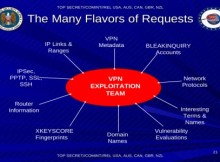
NSA VPN exploit
To crack OpenVPN the NSA advises to use XKEYSCORE with X.509 digital certificates, it then shows some real examples of how they fingerprint HostSpotShield, Easy hide IP, Comodo VPN Trust Connect and SecurityKiss, enumerating the ports each service is using with references to their RSA key. Other documents mention that the NSA is aiming at processing 100,000 requests per hour by 2011, this means that they should be able to decrypt and reinject data of 100,000 VPN users, a capability that I am guessing will have considerably increased since then.
There are comparisons in between single hop proxies, picking as example Psiphon, multihop proxies that pick JonDo as example and Tor, the comparison lists the advantages and disadvantages of each one of the methods and ends with the conclusion that Tor remains the safest anonymous proxy available.
According to the NSA, “sophisticated targets” use Tor to access terrorist forums, it specifically names the terrorist forums al-Faloja, CEMF, al-Hisbah, shumukh, using this as the main reason why the NSA needs to identify Tor traffic, which apparently is hard to do. The only breakthrough the NSA mentions is the capability they have of identifying a few Tor servers, due to their unique characteristics of random digital certificate issuers and the certificates being always only valid for 2 hours.
NSA VPN providers
The secret documents call the Torbutton a “thorn in the side of SIGINT” (intelligence gathering) because it disables all active content and they have no work around. To crack Tor the presentation recommends “implanting a web server with poisoned content intended for target“, which in plain language means getting the target to download a file infected with a trojan horse.
A different 43 pages long NSA presentation gives more technical details about VPN traffic cracking and they mention that all branches have a specialist VPN representative to spy on a target. The same presentation says that the VPN team provides vulnerability analysis and suggests alternative approaches if exploitation is unrealistic. In one particular slide, the NSA stresses in capital letters that VPN exploits are POTENTIAL, depending on many different factors.
The second presentation illustrates the NSA success cracking PPTP traffic and goes onto name Iran Air, the Afghan government, Turkish diplomats and Kabul bank as some of those using PPTP to secure their communications. The NSA justification for spying on bank communications is that by following the money they find who is at the other end. And one very important reminder adds on the last page that “If it’s not exploitable now, that doesn’t mean it won’t be later“.
GCHQ Tor exploit
PPTP has been considered insecure for a long time, these documents not only confirm it, they also illustrate that it is being exploited on a daily basis. If you use a VPN make sure to only connect with the most secure protocol, OpenVPN. A second security measure should be to only sign up with a VPN company that has competent security staff, the NSA VPN exploitation for OpenVPN appears to rely on finding the pre-shared key.
Other jewels found on the leaked documents are that the NSA admits to not being able to crack PGP encryption and OTR (Off-the-Record Messaging), two of the documents show metadata without any transcription for the conversation, marked by NSA staff with the sentence “no decrypt available for PGP encrypted message“.
As for remailers, the “Internet Anonymity” NSA slides disclose that the agency considers Mixmaster and Mixminion the most secure remailers due to their high latency, adding that they are hardly used by anybody.
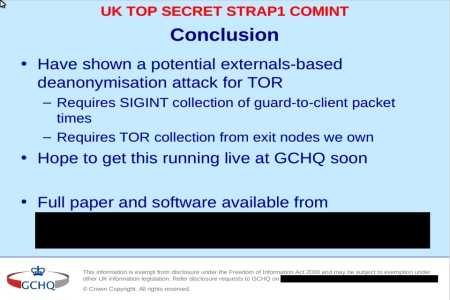
Without a doubt, the leaks show that the NSA has lots of interests in wiretapping VPN traffic. People worried about illegal spying could stick to Tor since the NSA admits that they can’t crack it, but a different GCHQ (UK secret service) presentation leaked in the same article and titled “potential technique to deanonymise Tor users“, mentions that the UK secret services is considering using Tor exit nodes they own to help them deanonymise Tor users, the presentation is highly technical and appears to be a future project, that, if it has been implemented, means that the GCHQ has deployed their own honeypot Tor exit nodes to log all traffic and with it any passwords you enter.
I can only see two solutions for the paranoid, one of them, is using double authentication to login to the VPN, you could use a key based SSH login with PuTTY, this places the encryption keys in your power and not in the server, this way only a trojan horse could steal your keys. The second solution, is to combine a VPN with Tor, which will slow down your Internet browsing.