Sending email via Gmail, Yahoo and Hotmail it is like sending a postcard, anyone who comes across it can read its contents, that includes your ISP and your email provider, Gmail even scans your email contents to introduce what they call relevant publicity, encrypting email messages is the only way to make sure that no third party can eavesdrop on your communications.
There are a few specialist webmail providers that use encryption end to end but you are trusting them with your encryption keys, in security you must trust as few people as it is possible, the more people has access to your private encryption keys the easier a data leakage will be.
Comodo SecureEmail works locally in your computer to send, receive and store encrypted emails, including attachments, it is easy to use and deploy, and free, you can digitally sign emails to confirming the sender’s identity, a digital signature is even harder to fake than a real life pen and paper signature. The software is compatible with Windows Live Mail, Thunderbird, Eudora and other IMAP and SMTP email clients. Comodo SecureEmail comes with a wizard to easily import a Comodo email certificate for encryption and digital signing, or just choose to import someone’s public encryption key instead.
Comodo Secure Email
If the receiver of the emails does not use Comodo SecureEmail he can still read the encrypted messages using a web based reader, the messages will be encrypted using a single use session digital certificate.
Comodo SecureEmail main features
Easy to use for newbies with automatic encryption and decryption of emails
It supports most email clients even if they haven’t got built-in encryption
Wizard to install the necessary digital certificates to encrypt and digital sign messages
Web reader service to decrypt messages encrypted using a single use digital certificate (aka session certificate)
This email encryption software is light in resources, a small 6.5MB download and it is very flexible, you will not have to swap email software, once the digital certificates have been installed the whole encryption process is automated without having to exchange public encryption keys, encrypting emails using a digital certificate is as secure as using PGP keys to secure messages and easier to use for newbies.
The Advanced Encryption Standard, aka AES, was selected by the National Institute of Standards and Technology (NIST) after a 5 year process in search of an encryption algorithm capable of protecting sensitive government informationwell into the next century and to replace the obsolete and aging Data Encryption Standard (DES) used until then.
The AES cipher is now the standard symmetric-key encryption algorithm for the US Government, this encryption cipher was not only chosen for it’s security, AES arithmetic is based on XOR operations and bit shifts making it fast.
AES is sometimes referred to as Rijndael, a wordplay based on the names of the two Belgian cryptographers who invented AES, Joan Daemen and Vincent Rijmen, strictly speaking Rijndael it is not the same because AES has a fixed block size of 128 bits and a key size of 128, 192, or 256 bits and Rijndael can be specified with key and block sizes in any multiple of 32 bits, with a minimum of 128 bits and a maximum of 256 bits.
Encrypted data
The AES cipher has been approved by the NSA for encryption of TOP SECRET information but just using AES is not enough to make sure nobody can crack it, the implementation of the algorithm is important too, that is why the US Government announced that “The implementation of AES in products intended to protect national security systems and/or information must be reviewed and certified by NSA prior to their acquisition and use“.
Encryption algorithm used by the US Government
The US Government established that information classified as SECRET could be safeguarded using AES with key lengths of 128, 192 and 256 bits while TOP SECRET data must use AES with 192 or 256 bits key length, AES offers a sufficiently large number of possible key combinations to make a brute force attack – trying every possible key- impractical for many decades.
Technological advances, roughly, double the speed of computing processors every year, in a scenario where encryption software using the AES cipher has been correctly implemented, if the attacker were to be someone owning state sponsored resources, i.e. a large network of supercomputers, in theory, cracking AES encrypted data might be possible in around approximately 50 years at the earliest.
When you compress files you will be saving computer hard disk space, bandwidth and speeding up data transfers, file compression is useful to get around email maximum file attachments size too. Commendable file compression tools will allow for password protecting of compressed files, the most popular file compression software, WinZip and WinRar both have sound uncrackable file encryption protection, but they are not free, they show you a nagging screen asking you to buy the software.
BCArchive is %100 free from day one and its encryption features beat WinZip and WinRar hands down, this file compression and encryption tool is multilingual, available in Arabic, Chinese, German, Farsi, Russian, Spanish and Turkish, it creates its own .bca compressed encrypted file or a self extracting .exe for people without BCArchive installed to be able to decrypt it.
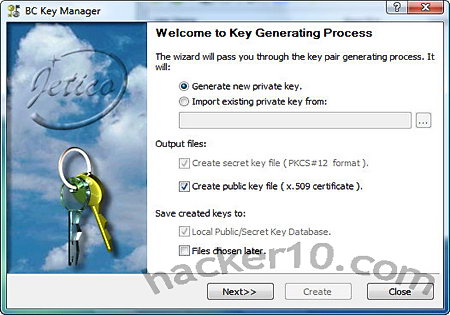
BCArchive encryption key manager
BCArchive integrates nicely with Windows shell right click, encryption and compression of a file can be done using two mouse clicks, if you use a password that is too short the software will not allow you to encrypt the file forcing you to use a better passphrase, when using symmetric encryption you can choose what encryption algorithm to use, some of the available ones are IDEA, Blowfish 448, AES Rijndael, Serpent, Gost, Cast5 and 3DES, you can choose the hashing algorithm as well SHA1, SHA256, RIPEMD160 or MD5. BCArchive symetric encryption ciphers are all well known in the cryptography community and considered sound, the best is to stick to the defaults if you don’t know which one to use.
It is possible to use asymmetric encryption with public and private secret encryption keys, you can create standard PKCS #12, X.509 public encryption keys within BCArchive key manager or import your own PGP keys created elsewhere, BC Keymanager allows you to import your PGP encryption keys directly from the Internet connecting to a PGP public key server.
To encrypt files use the interface or drag and drop files inside the BCArchive window, you can compress and encrypted files of up to 2 Terabytes in size. When you view files these are extracted to a temporary folder and securely wiped when the archive is closed, for those who are geeky, BCArchive can be run from the command line.
BCArchive main features
Self-extracting of encrypted files
Drag and drop of files and Windows shell integration
The seizure of Bin Laden’s computer and posterior forensic analysis of his hard disk and USB memory sticks is starting to bear fruit, according to a counter terrorism official speaking anonymously with Associated Press, although Bin Laden had no phone or Internet access at his hide out, he would still send emails to others using intermediaries.
Bin Laden himself would first write emails in his offline computer, save them to a thumbdrive and pass it on to a trusted courier who would then go miles away from Abbottabad to an Internet cafe and send the Al-Qaeda leader email messages copying and pasting them, that same courier would also save and copy all of the replies to Bin Laden onto a memory thumb drive and take them back to the compound for Bin Laden to read in his computer.
The Navy SEALs reportedly gathered 100 flash memory drives after they killed bin Laden, containing thousands of email messages and hundreds of email addresses, expected to lead to a small flood of subpoenas to email providers demanding computer IP connection addresses, and account holder details.
Al-Qaeda explosives training manual
Al-Qaeda operatives are known to change their email addresses often, it is likely that many of those email addresses have already been closed down but email providers do not erase all of the data from their server straight away, it can be kept for years after the account has been closed down, most likely months thought, email contents are not typically stored, but the last connection IP address with time and date are. Bin Laden’s computer hard disk also contained a huge amount of electronic documents that are still being looked into by Arabic translators working for the US Government.
Computer forensics Bin Laden computer
Bin Laden’s computer forensic analysis could be carried out by the National Media Exploitation Center (NMEC) a little known Department of Defense organisation that is designated as “clearinghouse for processing DoD collected documents and media“, their priorities are likely to be to discover imminent plots and finding out Al-Qaeda operatives living in the USA.
The most likely scenario is that a wide range standard law enforcement computer forensics software (Encase, FTK, Sleuthkit) will be used, they will not rely on just a single tool, assuming no encryption was used, the forensics software will first index everything on the machine allowing for quick manual searches of keywords, terrorists are known to use keywords for their targets and comrades, this makes law enforcement work much more difficult when documents are leaked and conversations overheard.
Al-Qaeda encryption software
The US Department of Defence isn’t revealing if Bin Laden was using any encryption, but it is known that a few years back Al-Qaeda supporters released via an Islamic forum called Al-Ekhlaasan an encryption program called Mujahideen Secrets 2, it was the second release of this encryption software targeted at Al-Qaeda supporters, it can encrypt emails, securely wipe data and encrypt text messages as ASCII for easy posting at bulletin boards and websites.
This custom Al-Qaeda encryption tool, still used, provides different encryption algorithms, including AES, and symmetrical encryption keys (256 bit), asymmetrical encryption keys (2048 bit), it can be run from a USB thumbdrive to be used from an internet cafe, there is no need to install it in your computer.
Al-Qaeda encryption software Mojaheeden Secrets
As good as the Asrar al-Mujahideen encryption tool can be, one downside of using this custom tool to cipher messages is that the encrypted messages always start with the unique text: “#—Begin Al-Ekhlaas Network ASRAR El Moujahedeen V2.0 Public Key 2048 bit—” giving away that the user is likely an Al-Qaeda supporter since this encryption software is not publicly available for download.
The Al-Malahem Media Foundation from Al-Qaeda in the Arabian Peninsula – AQAP, publishes an online English language magazine called Inspire Magazine that always ends with the a three different contact email addresses and a copy of their public encryption key created with Mujahedeen Secrets.
Al-Qaeda in the Arabian Peninsula (Yemen) has proved itself an adaptable professional terrorist organization that ditched traceable mobile phones in favour of walkie-talkies and uses coded names, they routinely use encryption for emails when they must send them.
The .rar file is password protected with: Asrar@_EkLaAs.TsG@[$^/!p@]z-2008
UPDATE 2016: It has been recently confirmed in the news that Yahoo Mail acting under a secret US subpoena was mass scanning all email traffic in real time to detect messages containing the identifier header that this software adds and reporting them to law enforcement for further investigation.
AxCrypt is a free open source encryption program for Windows computers available in 32-bit and 64-bit versions, after installing AxCrypt it will integrate with your right-click menu and allow for single click encryption, it is very easy to use, there is nothing to configure, everything works straight out of the box after installation, you can right-click on a folder and instruct AxCrypt to encrypt the entire contents, the program will then create multiple encrypted file belonging to each one of the files inside.
The software interface is multilingual, available in 7 different languages, it can be used from the command line and a portable version of AxCrypt is available for those on the go wanting an encryption programs that runs from inside a USB thumbdrive.
There is no maximum file size for encryption, the only size limit comes imposed by your operating system boundaries on file size, AxCrypt runs on very low resources, to use AxCrypt you only need 5MB RAM, 2MB hard disk space, temporary disk space 1.5 the size of the file being encrypted, and a low end computer desktop CPU.
Because AxCrypt is open source, you can download the source code and compile the program yourself where you to feel inclined, you could check the source code for backdoors before compiling it.
AxCrypt encryption method
AxCrypt uses the AES algorithm with 128-bit keys for file encryption and SHA-1 for hashes, there is no backdoor, if you forget your password that is it. The AES encryption algorithm that AxCrypt uses was selected by NIST (American Nations Institute of Standards and Technology) after a 5 year process in which fifteen competing designs were presented, AES is the current Federal USA Government standard algorithm for encryption.
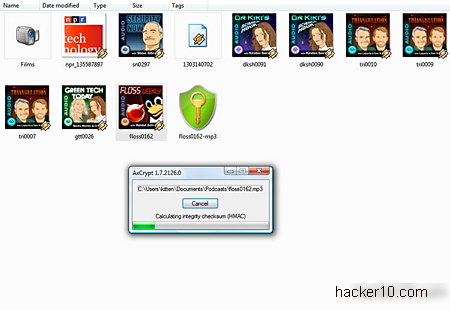
AxCrypt file encryption of MP3 file
Files encrypted with AxCrypt have the extension .axx, it retains the original file name and information, you can rename the file if you want to disguise a descriptive name, temporary files are automatically shred, the encryption keys are not stored in Windows page file. If you don’t want to erase the file after encryption you can just choose encrypt copy from AxCrypt menu.
To make it more difficult for an attacker to brute force your password and make the best of the full 128-bit encryption strength potential that AxCrypt offers, you should be using with a meaningless passphrase sequence of 22 characters, if you decide to create a keyfile with AxCrypt and use it for encryption your files will automatically be secured at the maximum level, the keyfile encryption method can be used in conjunction with a password.
AxCrypt software developers recommend that you always create a keyfile for encryption, the created keyfiles are made of 256 bits encoded in Base64, they are saved as a .txt text file with random characters in it.
AxCrypt file decryption
When sending your encrypted file over email to someone else that person will need AxCrypt installed to decrypt it, there is a free program called AxDecrypt that allows others to view AxCrypt encrypted files without installing the full software, AxDecrypt only serves to open files with the .axx extension and it can not encrypt.
You can choose to create .exe self-decrypting files, the other end does not need any kind of program to view the encrypted data, they just need to know the password used, one downside is that .exe files many times contain viruses and few people trust them, antivirus could flag them as a malware, and some email services like Gmail do not accept the sending of .exe file attachments.
Like all symmetric encryption software when you send an encrypted file to someone he/she will need to know the password you are using, you can transmit the password over a secure channel, ideally in person and if that it is not possible then using an encrypted VoIP call, or an Internet messaging program with built in encryption.
File encryption vulnerabilities
While AxCrypt contains no backdoor and the algorithm it uses can not be cracked at present, all file encryption programs have side vulnerabilities residing on the operating system, this is what you should watch out for.
Weak password, file encryption programs are only as good as your password
Solution: Use a very hard to guess passphrase not contained in a dictionary or use a keyfile to secure your files, use a password manager if needed to remember it.
Temporary files and backup copies stored by the your operating system while viewing the decrypted file
Solution: Use data wiping software in conjunction with your file encryption software, routinely wipe Windows locations where temporary files are normally stored, like for example the Windows page file, quality data wiping software come already preconfigured to securely erase those locations.
Your computer has a keylogger installed that captures your password
Solution: Have an updated antivirus and use a high quality firewall that will warn you of outgoing connections, the default Windows firewall will not do this.
AxCrypt file decryption
After decrypting a file AxCrypt will automatically overwrite it, secure data wiping consists of a single pass using pseudorandom data, this is enough to protect you from common undelete software but it will not protect you from expensive special diagnostics hardware used by well funded adversaries like corporations and law enforcement, if you need that level of protection get a different encryption software because data could be recovered from previously erased data.
AxCrypt online documentation is very complete, if you want to know the inner workings visit their homepage, if you get stuck, they have an online forum and a mailing list where to ask questions to other users.
Conclusion on AxCrypt file encryption
It doesn’t have the prettiest of interfaces and its configuration capabilities are next to none, while some might view this as a disadvantage, others will see it as an advantage because it makes operation very easy to understand for beginners.
AxCrypt strong points are that it is open source, it contains no backdoor, it uses a standard uncrackable algorithm for encryption (AES128) and it is easy to operate, its interface could be improved but it gets the job done, this is an excellent program for those on a budget because it is free (donationware) and it will securely encrypt your files.
I would not hesitate recommending AxCrypt to friends in need of secure encryption software but the single pass temporary data overwriting was disappointing, if you are a business user stay out of AxCrypt because it is only secure enough for the home user due to this.
VoIP calls are transmitted over the Internet unencrypted, the data packets can easily be intercepted by a malicious hacker to record the calls and listening in, a simple packet sniffer like WireShark is all that it is needed to eavesdrop on a VoIP call, no high skills are involved.
How to encrypt VoIP calls
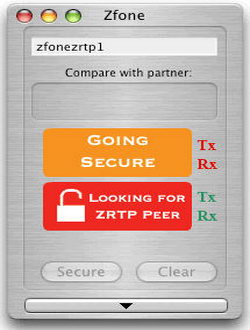
Use Zfone to add encryption to your VoIP client: Zfoneworks on top of your unencrypted VoiP software watching for VoiP data packets going in and out of your computer, when it finds them it ciphers the packets encrypting the VoIP call, there is also a man-in-the-middle (MiTM) attack countermeasure by displaying a short authentication string for the user to verbally compare over the phone witht the other end, Zfone is open source software using the ZRTP protocol, there are no backdoors of any kind included.Before considering Zfone to secure your VoIP calls have into account that the software must be installed by both callers and Zfone does not work with Skype because Skype uses a closed source protocol not compliant with the standard VoIP protocol.
Zfone VoIP encryption software
Use a Virtual Private Network (VPN): A VPN like HMA can encrypt all of your internet traffic routing it through their encrypted OpeVPN tunnel, this will include all of your VoIP calls. Routing your VoIP calls through a VPN will slightly increase the bandwidth requirement and produce some CPU overhead.One benefit of using a VPN is that if your ISP or a corporate firewall is blocking VoIP calls using a VPN for VoIP will get around Internet filters, they won’t even know you are making a call, it will also get around state sponsored surveillance which is normally carried out at ISP level.
Wiretapping VoIP password
Use VoiP software with built in encryption: Some VoIP clients like Skype have built-in encryption used to cipher VoIP data packets, if you adopt this solution to secure your phone calls, try to choose voice over IP software compatible with as many other VoIP clients as possible using open source encryption (not Skype) this will make it much harder to introduce a backdoor and it might not require the other end to have the same VoIP client installed for encryption to work.VoIP software using encryption: PhonerLite ; TiviPhone
You could use Truecrypt traveller mode to encrypt your data on a USB stick but in order to use Truecrypt on a computer you will need administration rights and this is not possible in public computers like Internet cafe and libraries. Rohos Mini Drive USB encryptrion doesn’t require administrative privileges to open your password protected USB thumbdrive partition on a guest PC.
Rohos Mini Drive uses on the fly encryption making sure no data is left unencrypted on the guest PC after you have finished viewing it, there is a secure virtual keyboard included to stop key-loggers capturing your password and data is encrypted using AES256 a well known secure algorithm approved by the US Department of Defense to encrypt secret information.
There is a feature called ‘Hide and Encrypt Folder’ that allows to encrypt profile folders of applications like Skype, Google Chrome and Firefox as well as regular PC folders. This feature locks applications data with a password and ciphers the content strong encryption, when your encrypted USB drive is not plugged in to PC the applications will be unable to start.
Rohos Mini Drive encrypted USB thumbdrive
This encryption software needs less than 1MB for stand alone installation and creates an encrypted .rdi file where to store your data, it includes Rohos Disk Browser to view and manage your encrypted files, this is very useful as it will help you to avoid using the guest computer Windows explorer and stop you from leaving temporary files behind.
The free version of Roho Mini Drive has a 2GB encrypted partition size limitation, you will need administration rights to preinstall Rohos Mini Drive on the USB flash drive first and after that this secure encrypted USB thumbdrive can be used anywhere without any admin privileges.
The company behind Rohos Mini Drive claims that there is no backdoor whatsoever, if you lose your password, that is it, that also means that nobody can force the company to decrypt data held in your USB thumb drive because they have no way of doing it.